Summary
The three leaks that cost the most, in the order I would fix them.
- The first screen shows a slogan instead of an offer
- Every form requires a phone number, and the self-assessment asks for it first
- The home page is slow to appear on a phone
Search and AI answers
Can a buyer who does not know the company yet find it?
I took two questions a buyer would ask and put each to Google, to Google's AI Mode, to ChatGPT with web search and to Perplexity, each time in a fresh browser with no login, and counted every firm each answer named. Answers change from one run to the next, so the table shows a single day.
Question 1 asked for the top integrators for PLC programming and control system upgrades in the company's region.
Question 2 asked for the leading alternatives to the firm that Google's AI Overview named first, for modernizing aging PLC and HMI systems.
| Where I asked | Question 1 | Question 2 |
|---|---|---|
| Google, AI Overview | Not named. The answer lists six integrators from the same region. | Not named. The answer lists six other firms and uses one of the company's own pages as a source. |
| Google, first page of results | Not listed. Nine results: five other integrators, three directories and a forum thread. | Listed fourth, with the company's page on control system upgrades. |
| Google AI Mode | Named first, ahead of four other firms, with two of the company's own pages among the sources. | Not named. The answer lists five other firms. |
| ChatGPT with web search | Not named. The answer lists eight other integrators, one of them in the company's own town. | Not named. The answer lists five other firms. |
| Perplexity | Could not check: it asked me to sign up before it would answer. | Not named. The answer lists four integrators and six platform vendors. |
I keep a screenshot of every answer. The image below is Google's AI Overview for question 1. I put a black box over every detail that could name a firm or a place, because the screenshots name the company, its region and its competitors.
Search engines and AI crawlers are allowed to read every page: the robots.txt file blocks none of them, and requests sent under the names of three AI search crawlers each received the full home page. On the three pages I read, the text is in the HTML itself, so crawlers that do not run scripts still see it. I found no access barrier that would explain why most answers leave the company out.
The site has no llms.txt file. I report that as a fact only, not a leak: Google says such files neither help nor hurt, and no major AI provider has confirmed using them.
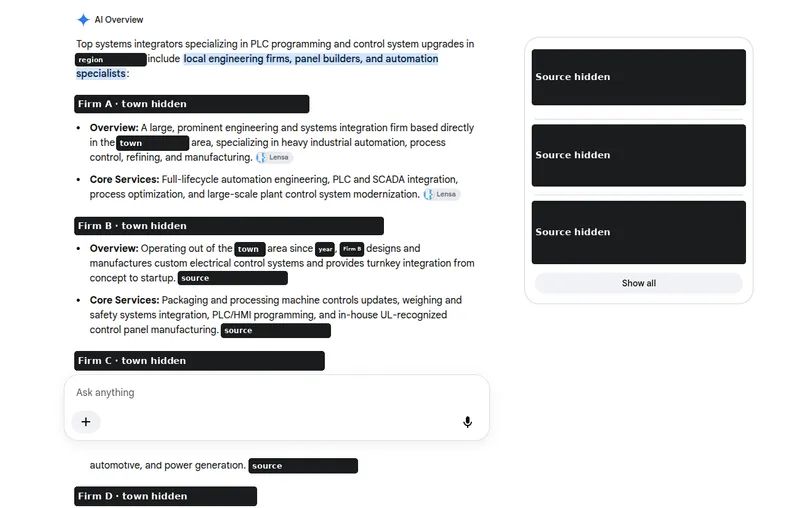
Most answers name the company's competitors and leave the company out
- What I saw
- For question 1, Google's AI Overview, its first page of results and ChatGPT name five to eight other integrators and leave the company out. Only Google's AI Mode names the company, and its sources include two of the company's own pages. For question 2, the company's page on control system upgrades is the fourth Google result and a source for the AI Overview, yet no answer recommends the company. The site's structured data describes the page, the site, its breadcrumbs and an image, and says nothing about who the company is, what it sells or where it works. None of the three pages I read names the company's region, and the town appears only inside the street address.
- Why it costs leads
- In three of the four places where I could check question 1, a buyer who asks for integrators in the region gets a ready shortlist without the company on it. The one answer that names the company used the company's own website as a source, and that website never states its region in the text and describes neither the company nor its services in structured data.
- The fix
- Add structured data that names the company, its address, the region it serves and each service, with links to its profiles on other sites. Name the region and the main services in the home page's first screen and in the page titles. Keep the company's profiles complete on the industry directories that appear in these results.
- Effort
- Medium. The company's team can write the copy and update the directory profiles; the structured data needs a developer or the settings of the site's SEO plugin.
The page
Can a buyer tell within about five seconds who the company serves, what they get and what to do next, on a phone and on a desktop? And how fast does the page appear?
I read the home page and the main service page at phone width and at desktop width, after scrolling each page to the bottom and accepting the cookie banner.
The home page does not shift as it loads: its layout shift measures 0.05, which Google rates as good. No page I read scrolls sideways on a phone, and the site's own scripts log no errors, so the fix list leaves the layout alone.
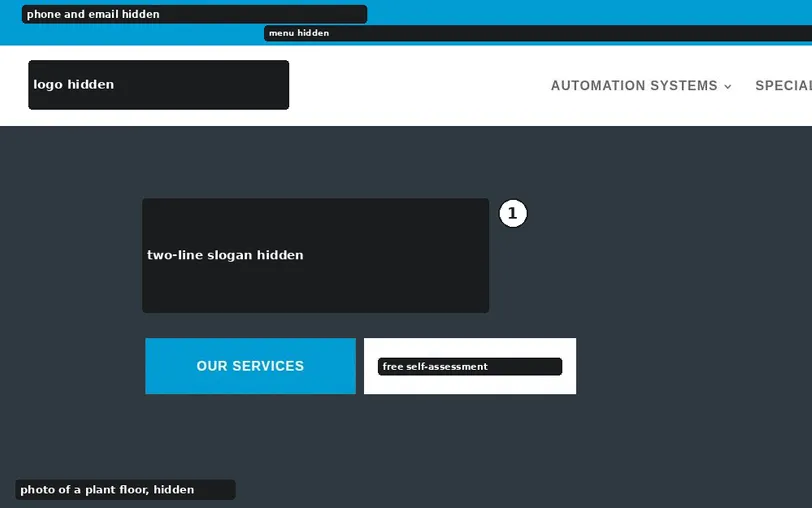
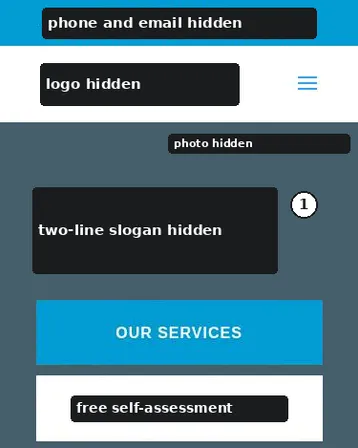
The first screen shows a slogan instead of an offer
- What I saw
- On a phone and on a desktop, the home page opens on a two-line slogan over a photo of a plant floor, with two buttons of equal weight below it: one to the services page and one to a free self-assessment. Nothing in that first screen says who the company serves, what a client gets or how the work runs. The first plain sentence about what the company does comes below that first screen.
- Why it costs leads
- My test is whether a buyer can tell within about five seconds that a firm does what they need. Here they have to scroll to find out. The site has a Google Ads tag, so some of the visitors who leave at this point are likely paid clicks.
- The fix
- Replace the slogan with one sentence that names the work, the kind of plants the company serves and the region. Then let one button lead, either the self-assessment or a request for an evaluation, and turn the services button into a plain text link beside it.
- Effort
- Small. The company's team can change the text and the buttons in the page editor.
The home page is slow to appear on a phone
- What I saw
- Google's PageSpeed Insights, run on October 13, 2026, scores the home page 55 out of 100 on a phone and 69 on a desktop. In the phone test, the largest element of the first screen appears after 4.7 seconds, and Google rates anything over 4 seconds as poor. These are lab figures from a simulated phone, because Google has too little data from real visits to this site to report measured ones. The largest savings the report names are files that block the first paint, about 2.5 seconds, and unused JavaScript.
- Why it costs leads
- In this test, a phone visitor waits 4.7 seconds for the main content of the first screen. Each of those seconds is time for that visitor, paid clicks included, to go back to the search results.
- The fix
- Load the styles and scripts that the first screen does not need only after that screen has appeared, remove the JavaScript the page does not use, and serve images at the size they are shown. Then run the same test again to confirm the change.
- Effort
- Medium to large. It needs a developer who knows the site's theme.
Proof is far below the first button and names no one
- What I saw
- The testimonials start about 71 percent of the way down the home page on a desktop and 83 percent on a phone. Each one gives a job title and an industry, never a person or a company.
- Why it costs leads
- A buyer deciding whether to press the first button sees no proof beside it, and a quote without a name or a company gives a careful buyer nothing to check.
- The fix
- Move two or three short testimonials beside the first button, and ask the clients behind them for permission to show their name and company.
- Effort
- Small to medium. Moving the block is a small change; the names need each client's permission.
On a phone, the service page's only button is hidden under the cookie banner
- What I saw
- On a phone, the main service page's only button starts 779 pixels down an 812-pixel screen, and the cookie banner covers that part of the screen until the visitor makes a choice.
- Why it costs leads
- A visitor who lands on the service page from an ad or a search sees no next step until they close the banner, and even then the button is at the bottom edge of the screen.
- The fix
- Place the button in the upper half of the phone screen, and make the cookie banner shorter on phones so it covers less of the page.
- Effort
- Small. The company's team can make both changes.
Zoom is switched off on phones
- What I saw
- Every page I read has a viewport setting that stops a visitor from pinching to enlarge the text.
- Why it costs leads
- Visitors who need larger text cannot get it, which makes the forms and the service details harder to read on a phone.
- The fix
- Remove the two settings in the viewport tag that block zoom.
- Effort
- Small. It is a one-line change for whoever maintains the theme.
The form
Which fields would make a first-time buyer hesitate, does each form work on a phone, and what happens when someone presses send?
I read the contact form, the free self-assessment linked from the home page and a five-field form built into every page. I typed nothing into them and sent nothing.
The contact form is protected against spam, and the contact page fits a phone screen without sideways scrolling.
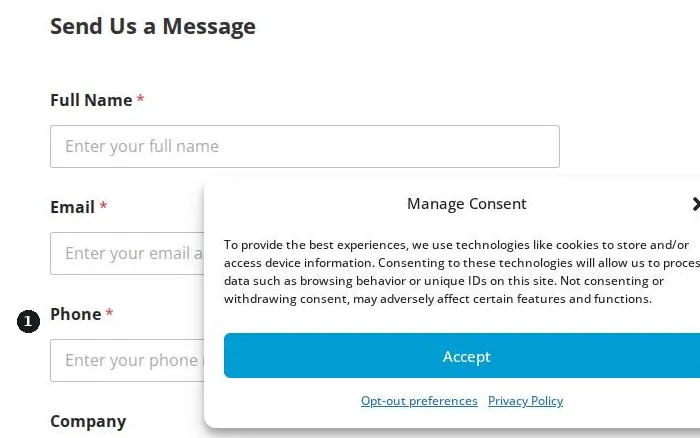
Every form requires a phone number, and the self-assessment asks for it first
- What I saw
- All three forms require a phone number: the contact form, which has six fields with four of them required, the free self-assessment, and the five-field form built into every page. The self-assessment asks for name, work email and phone on its first step, before any of its seven questions.
- Why it costs leads
- A required phone number reads as a request for a sales call, and a buyer who is still comparing firms may not want one yet. Asked before the self-assessment has given anything back, it puts that cost ahead of the value, at the moment the buyer has shown the most interest.
- The fix
- Make the phone number optional on every form. Move the self-assessment's contact step to the end, after the questions, where the buyer gives an email to receive the result.
- Effort
- Small. The company's team can change both in the form settings.
The follow-up
What does a visitor see after sending, what does the site say about a reply, and is the request counted?
The analytics and advertising tags load before any cookie choice, so the cookie banner does not block them.
Could not check without sending a request: whether a confirmation email goes out, how fast a person replies, and whether a sent form is counted as a conversion. A test request needs the company's written consent first, so a public diagnosis sends none.
The forms do not say when a reply comes
- What I saw
- The five-field form's confirmation, as written in the page's code, is a single line saying the message was sent, and the self-assessment says its report follows by email. None of the three pages I read states when a person will reply.
- Why it costs leads
- Without a stated reply time, a buyer keeps the other firms on the shortlist in play.
- The fix
- State a reply time beside each form's button and repeat it in the confirmation, for example within one business day, and send an automatic email that confirms the request and the reply time.
- Effort
- Small. The company's team can add the line, and the automatic email is usually a form setting.
What I would fix first
All eight leaks, ranked by what each one costs against the effort to fix it. The company's own team can make the fixes marked as theirs from the written fix alone; the others need help.
| Leak | Effort | Who can do it |
|---|---|---|
| The first screen shows a slogan instead of an offer | Small | The company's team |
| Every form requires a phone number, and the self-assessment asks for it first | Small | The company's team |
| The home page is slow to appear on a phone | Medium to large | Needs help: a developer |
| Most answers name the company's competitors and leave the company out | Medium | The company's team for the copy and profiles; a developer for the structured data |
| Proof is far below the first button and names no one | Small to medium | The company's team, with each client's permission |
| On a phone, the service page's only button is hidden under the cookie banner | Small | The company's team |
| The forms do not say when a reply comes | Small | The company's team |
| Zoom is switched off on phones | Small | Needs help: whoever maintains the theme |
One offer
The diagnosis ends with an optional 30-minute call to scope a Fix, the project in which I close the leaks that need help, in slots I set. The diagnosis is the company's to keep either way, and the company can use it with anyone.